
Build an organization news database from social media posts.
PostLineNews imports Facebook, Instagram, and LinkedIn content, backs up the original posts, and turns organization updates into structured news records. LinkedIn pages can be monitored daily so new posts are archived before they become hard to access later.
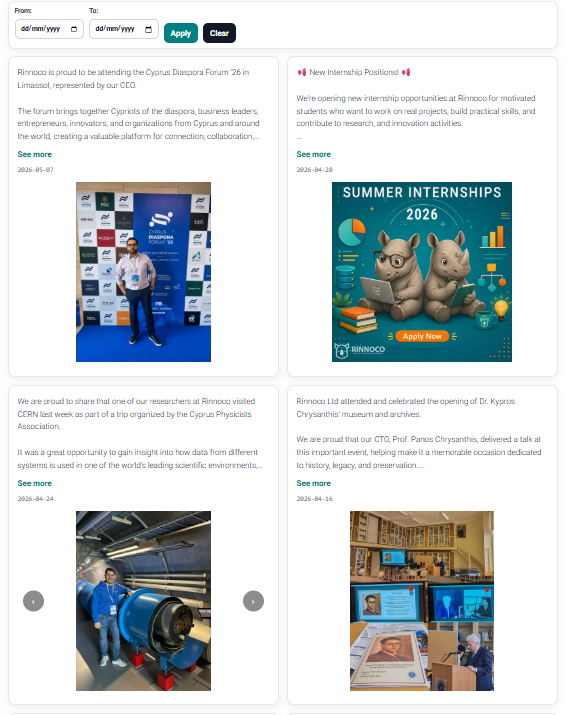
Social platforms are not long-term archives.
Older LinkedIn posts and platform exports can become difficult to retrieve over time. PostLineNews captures the source content when it is available, keeps post text and media together, and preserves the evidence behind every news item.
What PostLineNews helps you do
A focused system for turning organization social activity into a reliable, searchable news database.
Import existing posts
Bring organization content from Facebook, Instagram, and LinkedIn into one controlled database.
Back up source content
Store the original post text, dates, links, and available media so the source record does not depend on platform retention.
Monitor LinkedIn daily
Automatically check LinkedIn company pages for new posts and keep the archive updated without manual tracking.
Create news records
Convert social updates into organized news items that can be reviewed, filtered, exported, and reused.
Export reports
Generate Excel exports for internal reporting, long-term archiving, or sharing with your team.
Publish on your website
Use a secure widget to display selected organization news on approved domains.
How it works
Upload Facebook, Instagram, or LinkedIn exports, or add a LinkedIn company page.
Keep post text, dates, source links, and media together as a durable archive.
Review, search, export, and publish selected organization updates as structured news.
Start building your organization news archive
Import social posts, preserve the original content, and keep LinkedIn updated automatically.
FAQ
Who is PostLineNews for?
PostLineNews is for organizations that want to turn their social media activity into a structured news database and preserve the original source posts.
Which platforms are supported?
PostLineNews currently supports imports from Facebook, Instagram, and LinkedIn. LinkedIn also supports daily monitoring and automatic updates.
Is there a free trial?
Yes. You can try PostLineNews free for 15 days before choosing a subscription plan.
How many posts are imported the first time from a LinkedIn page?
The first LinkedIn page import adds the 10 most recent posts found on your company page.
Are posts updated automatically?
Yes, for LinkedIn company pages. PostLineNews can check daily for new LinkedIn posts and add them to your archive automatically.
Can I upload posts from a file?
Yes. You can upload supported export files to import historical posts into your dashboard.
Can posts include images and videos?
Yes. Posts can be enriched with images and videos so they are easier to review and display.
Are events imported with media?
Page posts can include media, but event posts may be imported without media depending on what is publicly available.
Can we export posts for reporting?
Yes. You can generate Excel exports for internal reporting, archiving, or sharing with your team.
Can we show the news archive on our website?
Yes. PostLineNews supports a secure widget for displaying selected organization news on approved company domains.
Can access be controlled?
Yes. Access can be managed through account permissions and subscription status.